
Receive
One official entry point
Chat with our WAB2C experts
Get instant answers about WhatsApp API,
pricing, and features.
Available 24/7 • Response within 5 minutes
Shared work with accountable ownership
Give sales, service and operations one controlled workspace—without losing who owns the customer, what happens next or how work closes.
One customer history
Named owner at every stage
Internal collaboration stays internal
Manager evidence in real time
WAB2C Team Inbox
Shared work · accountable ownership
Can I reschedule my service visit for tomorrow?
10:24
Yes. I have your booking and vehicle details. Ayesha from the Warranty Desk owns the next step.
10:24
Owned conversation
Handoff acceptedQueue: Service requests
Owner: Ayesha · Warranty Desk
Internal note: Parts approval requested
Next action: Call customer
See the operating logic
Each conversation moves through a visible state with one current owner, a clear next action and evidence the team can inspect.
One official entry point
Intent + context
One named owner
Notes + actions
Reason + evidence
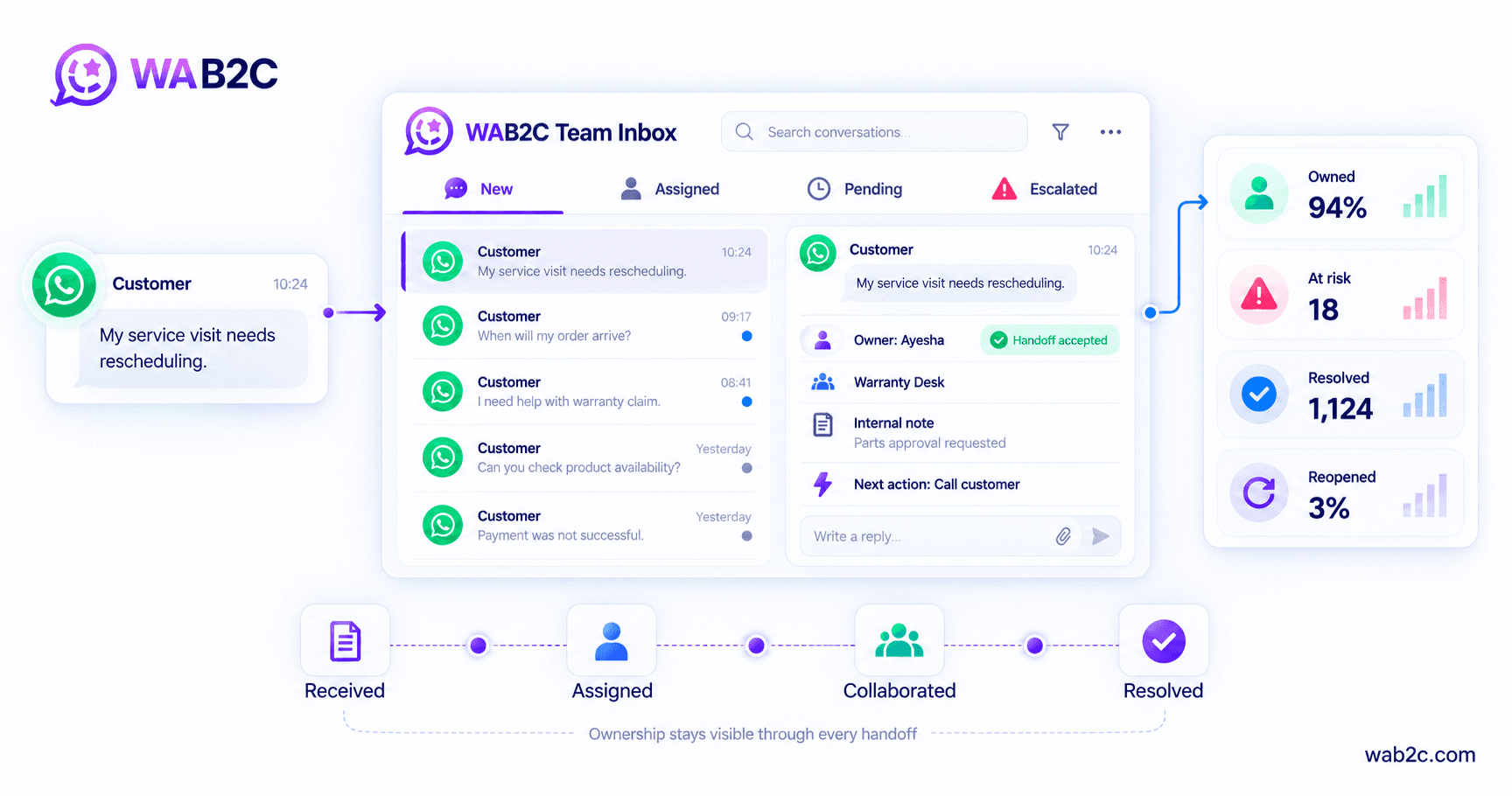
One shared inbox. One visible owner. Every handoff accounted for.
Customer history, ownership, internal notes and next actions stay connected while authorised teams collaborate.
Shared entry → named owner → collaboration → closure
01Agent workspace
Move between the conversation, customer context, internal collaboration, media and operating controls without leaving the customer record.
WAB2C Team Inbox
Live workspace · agent AG-17
Adeel Khan · “Mr Adeel”
Lead 10428 · Warranty · Priority
The warning light appeared again. I have attached a photo.
I can help. I’ve added this to your warranty case and assigned the next step.
Ayesha · AG-17 · 10:25
02Assignment studio
Team distribution and agent ownership are two different decisions. Configure both, then preview how an actual conversation becomes accountable.
Where should it land?
Choose a team distribution model.
When does ownership begin?
Choose one accountable event.
Incoming
Customer message
Destination
Warranty · North
Ownership
Next eligible agent
Outcome
Named owner + audit
Selected route
Specific team
Use approved customer and conversation parameters to land work directly with the team equipped to resolve it.
Ownership event
Agent round robin
The system rotates work across available agents within the selected team and assignment boundary.
Best operational fit
Repeatable high volume
Context-led routing
03Visibility and authority
Explore the operating view for an Agent, Team Lead, Manager or Admin. Visibility expands while conversation ownership remains explicit.
My team
Sees team demand, individual workload and risk so assistance or reassignment can happen before the customer journey stalls.
Every conversation in the team
Agent workload and availability
Queue exceptions and response risk
04Automation control room
Automation is not a collection of pastel cards. It is a controlled sequence of triggers, conditions, ownership actions and evidence.
Team Inbox automation studio
Rule EV-WARRANTY-014 · published
A trigger evaluates approved parameters, selects the right queue and records the owner and next action.
Trigger
New WhatsApp conversation
Conditions
Warranty · North · High
Action
Assign Warranty Team
Every automated action retains the conversation, selected rule, resulting owner and next action.
Actual Meta charges, messaging categories, service windows and template eligibility follow the applicable Meta and provider rules. Configuration is validated against the customer’s approved operating policy.
05Management intelligence
A useful command center does not become enterprise-grade by turning dark. It earns attention by showing what changed, what is at risk and what action is expected next.
Team Inbox intelligence
Operating data · today · Pakistan
Executive view
One decision view for demand, ownership, responsiveness and risk.
12,480
Conversations
94%
Named owner
3m 18s
First response
27
Needs action
Demand and owned workload
Click another view to change the management lens.
Sales 3,820
91% owned · 18 at risk
Service 4,940
97% owned · 6 at risk
Support 2,610
94% owned · 3 at risk
Escalations 1,110
100% owned · 0 unowned
Action queue
What requires attention now
Unassigned conversations
12 · oldest 9m
Service-window risk
8 · under 2h
Workload imbalance
Sales Pod B
Template allowance
2 users near limit
Three-layer operating model
The workspace, collaboration and management layers answer three buyer questions: where work sits, who owns it and how leaders know it closed.
One official inbox holds the conversation history, queue, priority and work state so every authorised team starts from the same record.
One shared customer history
A named owner coordinates internal notes, actions, mentions and accepted handoffs without exposing internal work to the customer.
Shared work, explicit owner
Backlog, response risk, pending reasons, workload, closure and reopen evidence give leaders an operating view—not only a message count.
Performance can be inspected
Organize work by team, queue, assignment state, priority and operational status.
Operating controlTransfer responsibility without forcing the customer to repeat the journey.
Operating controlUse notes, labels and ownership signals to coordinate without exposing internal work.
Operating controlSee open demand, response risk, agent activity and unresolved work.
Operating controlTeam Inbox command view
Ownership, workload and closure snapshot
1,284
Conversations
94%
Named ownership
18
At risk
EV-10428
Warranty request
Ayesha · Pending parts
PendingEV-10431
New order
Sales pod · Owner set
OwnedEV-10436
Payment dispute
Finance review
At riskEV-10442
Service visit
Service desk
ResolvedTeams, queues, access roles, work states and connected systems are confirmed during enterprise solution design.
Control and standards alignment
ISO/IEC 27001:2022
Use role-based access, controlled change and traceable user activity as information-security management evidence.
Evidence to validate
Role and access matrix · change record · activity evidence
ISO/IEC 20000-1:2018
Connect agreed work states, accountable service ownership and continual improvement to the Team Inbox operating model.
Evidence to validate
Work-state definition · service owner · review cadence
ISO 10002:2018
Design accessible capture, accountable progress, status communication, closure and improvement evidence for complaints.
Evidence to validate
Complaint owner · progress path · closure reason
ISO 22301:2019
Define shift handoff, recovery ownership and alternative operating paths before a critical queue is activated.
Evidence to validate
Handoff runbook · recovery owner · continuity test
Role and access matrix
Named ownership history
Controlled internal notes
Closure reason and review
Team Inbox workforce capacity planner
Translate daily demand and active handling time into workload, staffed-seat requirement and available Team Inbox capacity. Every assumption and formula stays visible.
Your Team Inbox workload
Tap +/−, type a number or use the slider.
Daily incoming conversations
New and continuing customer threads the Team Inbox must handle during one operating day.
Example: 850 conversations can span sales, service, payments, delivery and support queues.
Active handling time
Average minutes an agent actively reads, investigates, replies, notes and updates one conversation.
Example: 7 minutes covers hands-on work; waiting for the customer is not counted.
Scheduled agents per shift
Agents rostered to work inside this Team Inbox during the same operating period.
Example: 18 agents may be distributed across sales, confirmations, service and escalations.
Productive minutes per agent
Minutes in a shift available for conversation work after breaks, meetings, coaching and other duties.
Example: 360 minutes equals 6 productive hours per scheduled agent.
Target occupancy
The planned share of productive time used for active conversation handling, leaving headroom for demand spikes.
Example: 80% keeps 20% headroom for peaks, escalations and operating variation.
Daily capacity decision
3 more staffed seats needed99h
conversation workload per day
740
conversations/day at target
21
required staffed seats
92%
demand occupancy · target 80%
Capacity position
110 conversations above planned capacity
at 80%
target occupancy
Formula and calculation transparency
1. Daily workload minutes
Daily conversations × active handling minutes
850 × 7 = 5,950 minutes
2. Usable capacity per agent
Productive minutes × target occupancy
360 × 80% = 288 minutes
3. Required staffed seats
Round up: workload minutes ÷ usable capacity per agent
ceil(5,950 ÷ 288) = 21 seats
4. Team conversation capacity
Agents × usable minutes per agent ÷ handling minutes
floor(18 × 288 ÷ 7) = 740
5. Actual demand occupancy
Workload minutes ÷ total scheduled productive minutes
5,950 ÷ (18 × 360) = 92%
Seat requirement rounds up because a fraction of a staffed seat cannot cover a full operating day. Conversation capacity rounds down. This planning model excludes shrinkage forecasting by interval, concurrency, backlog age, channel mix, service-level targets and staffing cost.
Use this result to decide
Whether the shift is under-covered
Where queue segmentation is needed
How much surge headroom remains
Which assumptions require validation
The result is a workload-capacity planning estimate, not a staffing guarantee. Validate demand by interval, peak behavior, absence, concurrency and service-level requirements before making workforce decisions.
Enterprise readiness checklist
Check what is already true today. Every unchecked item becomes a practical discovery question for operations, technology and procurement.
Readiness progress
0%
0/8 Team Inbox readiness checks complete (0%).
Affirmative Use Case · Nationwide EV customer service
Customers use one WhatsApp entry point while each request reaches the right EV team, keeps its history and retains one named owner until a documented outcome.
An EV customer may move from delivery to registration, warranty, service booking or parts without knowing the company structure behind the answer.
The accepted handoff transfers identity, vehicle, history, promised next action and current ownership to the receiving team.
Backlog, pending reasons, accepted handoffs, unresolved risk, closure and reopen evidence remain comparable by team and journey.
Nationwide EV Team Inbox record
Customer + vehicle + history + owner + next action
Delivery desk
Connected to Order and registration
Named owner visibleWarranty desk
Connected to Claim and parts review
Named owner visibleService team
Connected to Appointment and work status
Named owner visibleCustomer care
Connected to Promised resolution
Named owner visibleThe customer keeps one coherent journey while internal teams retain accountable work, accepted handoffs and closure evidence.
Customer reviews
Approved feedback from leaders using WAB2C across customer operations, professional services and technical support.
“WAB2C helped our customer operations move faster across sales and service. The team understood our requirements, supported implementation closely, and remained responsive whenever our automotive workflows needed refinement at scale.”
Sumair Ahmed
CIO · EV Company
“WAB2C gave our accounting and taxation teams a clearer way to manage client conversations. Their support team guided setup carefully, answered technical questions promptly, and helped improve internal ownership controls.”
Syed Abubakar
Head of IT · Accounting & Taxation Company
“WAB2C brought structure to our repair enquiries and customer follow-ups. The implementation team remained accessible, resolved configuration questions quickly, and helped our technical staff manage conversations with confidence every day.”
Bilal Saeed
CTO · Mobile Phone Repair Company
Enterprise guardrails
Least-privilege access where supported
Visible ownership and transfer expectations
Documented use of notes, labels and closure reasons
Meta approvals, messaging policy, provider infrastructure and external systems remain dependencies unless explicitly included in the written scope.
The reason to meet
Bring your teams, queues, roles, work states, service risks and connected systems. The discussion will identify the ownership model, handoff rules, access boundaries, manager view and measures that need validation.
Teams, queues and access roles
Ownership and accepted-handoff rules
Pending, escalation and closure states
Manager evidence and integration plan
Decision FAQs
Short, direct answers for leadership, technology, operations and procurement teams evaluating accountable work on one enterprise WhatsApp channel.
The operating design assigns one current owner while other teams contribute through internal notes, actions and controlled handoffs. A transfer is complete only when the receiving owner accepts responsibility, so collaboration does not turn into shared ambiguity.
Compare the four ownership rulesYes, where the agreed role and access model is supported. WAB2C can separate agent, team-lead and cross-team management views so operational oversight is available without treating unrestricted access as the default.
Review the role and visibility hierarchyYes, where the rule, source and integration are supported. WAB2C can use approved parameters to assign a task, surface permitted context and trigger supported actions while authentication, data ownership, reconciliation, failure handling and fallback behavior are confirmed before implementation.
See task automation and credit governanceMeasure demand, named ownership, first response, pending age, handoff acceptance, unresolved risk, closure reason, reopen rate and completed customer outcomes by journey and team. Definitions and assumptions should be agreed before targets are used for performance decisions.
Review the management reporting layerValidate teams, queues, roles, access boundaries, work-state definitions, handoff rules, retention, audit evidence, integrations, continuity, onboarding, support, service levels and the written responsibility boundary between WAB2C, Meta, providers and customer systems.
Use the Team Inbox readiness checklist